

Branch and merge
The ability to connect inputs and outputs described in the Linear chaining and Multiple I/O chapters can be further extended to direct a task's outputs to separate computation paths and merge the results together. This technique, known as branching and merging, is a common way to run multiple steps of a broader analysis in parallel.
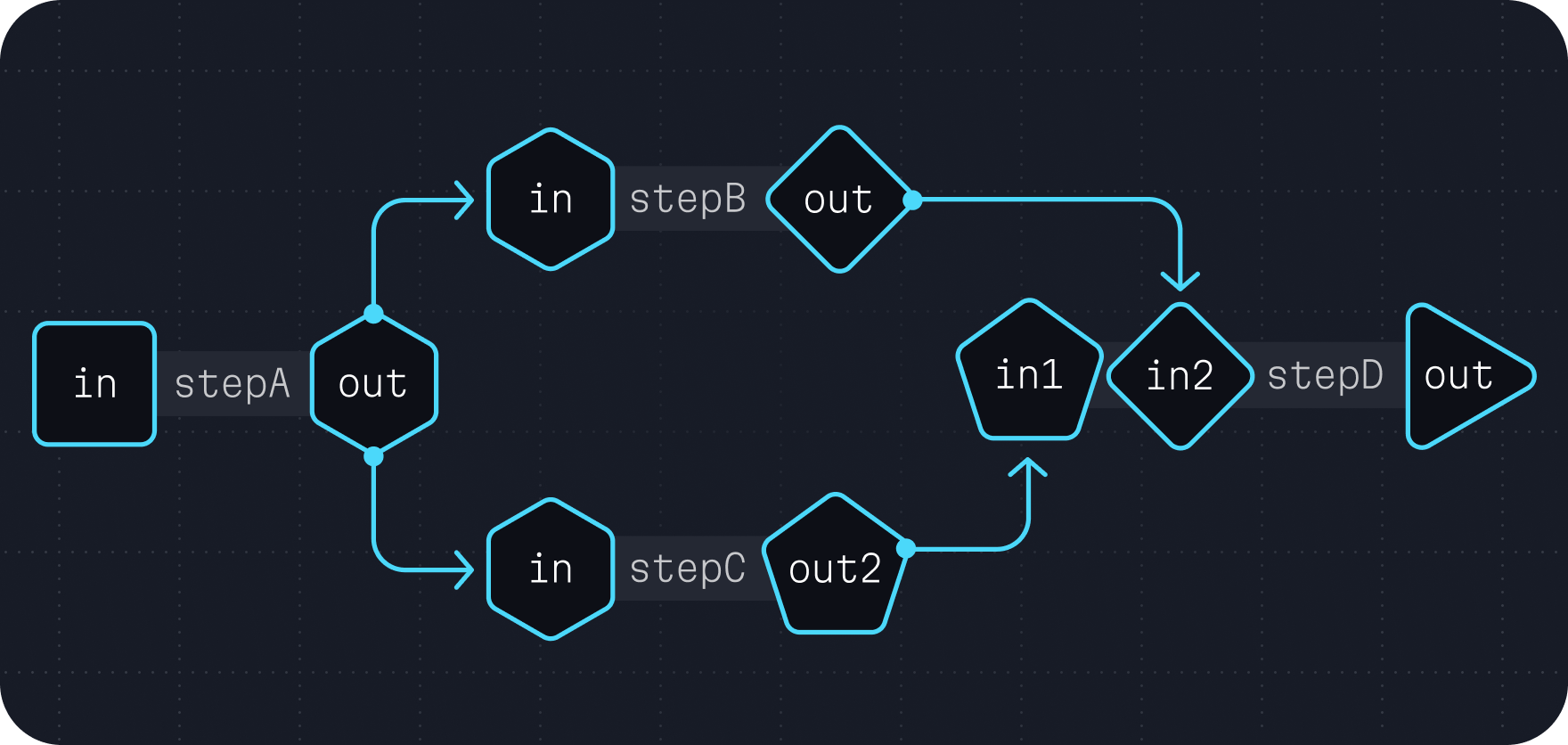
This often takes a form similar to the following example.
wdl# ... task definitions ... workflow run { # Run the first task. call stepA {} # Run `stepB`, connecting the `value` input to `stepA`'s `out` output. call stepB { value = stepA.out } # Run `stepC`, connecting the `value` input to `stepA`'s `out` output. call stepC { value = stepA.out } # Run `stepD`, connecting the `in1` input to `stepB`'s `out` output # and the `in2` input to `stepC`'s `out` output. call stepD { in1 = stepB.out, in2 = stepC.out } }
Continuing our example
To build on the example started in Multiple I/O, we'll extend this workflow to have a filtering step for single nucleotide polymorphisms and indels separately. This introduces a branch in our computation graph where the filtering steps can be run concurrently and merged back together after completion.
wdlversion 1.3 # (1) We write a task to split the VCF into multiple VCFs. task split_vcf { input { File vcf } command <<< picard SplitVcfs \ I="~{vcf}" \ SNP_OUTPUT="snp.vcf" \ INDEL_OUTPUT="indel.vcf" \ STRICT=false >>> output { File snp_vcf = "snp.vcf" File indel_vcf = "indel.vcf" } } # (2) We write a task to filter SNPs using our criteria. task filter_snps { input { File vcf } command <<< gatk VariantFiltration \ -V ~{vcf} \ -O filtered.vcf \ --filter-expression "QD < 2.0 || FS > 60.0 || MQ < 40.0 || MQRankSum < -12.5 || ReadPosRankSum < -8.0" \ --filter-name "snp_filter" >>> output { File filtered_vcf = "filtered.vcf" } } # (3) We write a task to filter INDELs using out criteria. task filter_indels { input { File vcf } command <<< gatk VariantFiltration \ -V ~{vcf} \ -O filtered.vcf \ --filter-expression "QD < 2.0 || FS > 200.0 || ReadPosRankSum <-20.0" \ --filter-name "indel_filter" >>> output { File filtered_vcf = "filtered.vcf" } } # (4) We write a task to merge these two VCFs. task merge_vcfs { input { File snp_vcf File indel_vcf } command <<< picard MergeVcfs \ I="~{snp_vcf}" \ I="~{indel_vcf}" \ O="combined.vcf" >>> output { File combined = "combined.vcf" } } # (5) We write a workflow that branches to the two filtering steps # and merges back in the `merge_vcfs` task. workflow run { input { File vcf } call split_vcf { vcf } # (a) The branch happens here. call filter_snps { vcf = split_vcf.snp_vcf } call filter_indels { vcf = split_vcf.indel_vcf } # (b) The merge happens here. call merge_vcfs { snp_vcf = filter_snps.filtered_vcf, indel_vcf = filter_indels.filtered_vcf, } output { File combined = merge_vcfs.combined } }